

"Avoid motion" profile
Epilepsy, migraine, vertigo: a calmer page, in one click
Octeasy's "Avoid motion" profile freezes the site's animations and transitions in one click, pauses videos that start by themselves, mutes sound and softens colours. It makes the page calmer, without replacing a site designed without flashing.
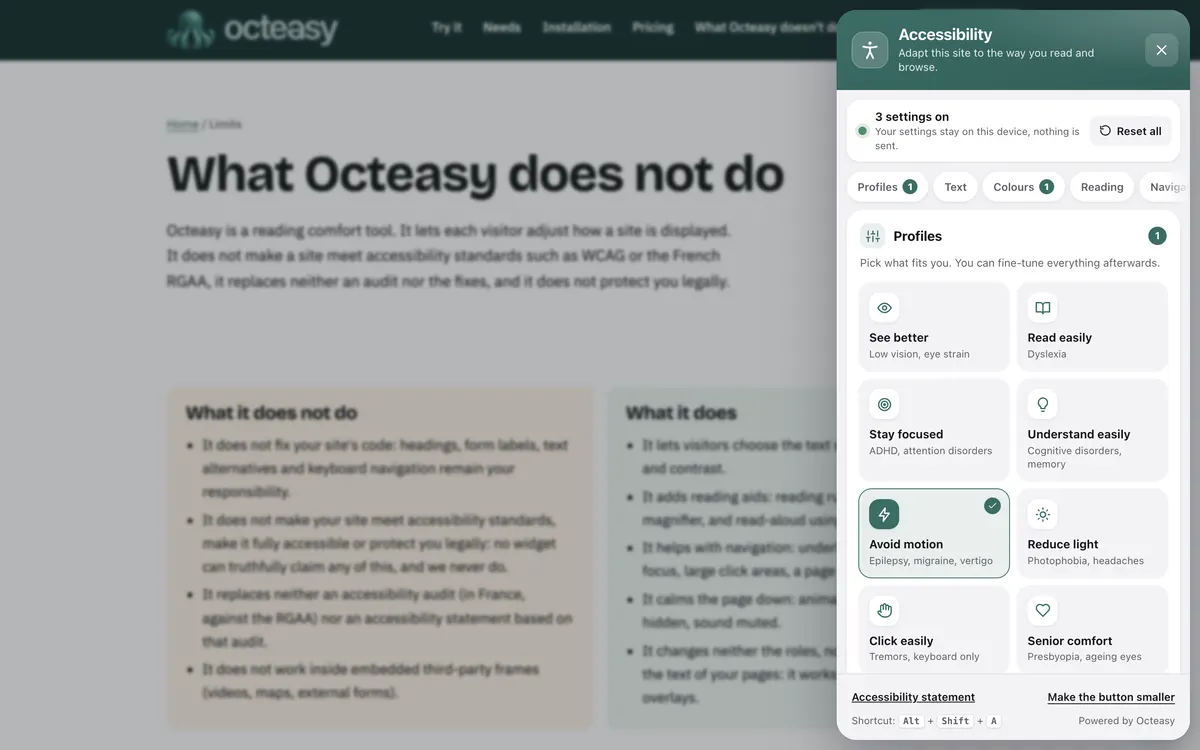
In the panel, choose "Avoid motion". Shortcut: Alt + Shift + A.
- Free for visitors
- No cookies
- Settings stay on the device
- Panel in English and French


- Animations stopped
- Transitions off
- Instant scrolling
- Autoplay videos paused
- Colours at 45%
- Sound muted
Who benefits from the "Avoid motion" profile?
The profile is designed for people who are troubled by motion, flashing or bright colours: photosensitive epilepsy, which affects around 3% of people with epilepsy according to the Epilepsy Society, migraine and vertigo. It also helps anyone, with no condition at all, who wants to read a still page, with no carousel or video that starts by itself.
With a condition
- Photosensitive epilepsyFlashing lights or contrasting patterns can trigger a seizure. The profile freezes CSS motion but guarantees nothing: a site built without flashes is what reduces this risk at the source.
- MigraineSensitivity to light is one of the symptoms of an attack. A still page with softer colours can be more comfortable.
- Vertigo and vestibular disordersParallax and animated scrolling can cause dizziness and nausea. The profile removes transitions and smooth scrolling.
In everyday life, no condition at all
- "Moving carousels wear me out"CSS-animated banners stop: you read at your own pace, without one image chasing the next.
- "I read on the train"The NHS advises avoiding screens when travelling. If you read anyway, a still page does not add its own motion to the train's.
- "I can't stand videos that play by themselves"Videos on the page that autoplay or loop are paused, and the sound is muted.
- "I want a calm page"Less motion, softer colours, no sound: your attention stays on the text.
How to reduce motion on a website: what the profile changes
Anything that moves, flashes, slides or makes noise without being asked for demands attention and can get in the way. The "Avoid motion" profile deals with six things at once, across the whole page, without reloading it. Anything drawn with JavaScript, an embedded video or a GIF may keep running.
What gets in the way : Banners, carousels and icons never stop moving
What the profile does : Stop animations CSS animations frozen
Each animation jumps to its final state and no longer repeats.
What gets in the way : Blocks slide, zoom or fade with every action
What the profile does : Transitions off instant
Menus and pop-ups open at once, with no effect.
What gets in the way : The page scrolls by itself to a section
What the profile does : Instant scrolling no smooth scrolling
You land where you meant to go without watching the page glide.
What gets in the way : A video starts by itself or loops
What the profile does : Autoplay videos paused once
Only videos on the page itself. If you restart one, it keeps playing. A video embedded from YouTube is not affected.
What gets in the way : Sound starts without warning
What the profile does : Mute sound video and audio muted
For players on the page itself.
What gets in the way : Bright colours overwhelm the screen
What the profile does : Soft colours 45% saturation
Hues stay recognisable. Grey is also available.
Also in the panel
- Hide images Keeps only the text: images, animated GIFs and videos are hidden from view.
- Soft dark A dark display that avoids glaring white, useful when light is uncomfortable.
- Page outline Jump straight to a section, without scrolling through the whole page.
- Reading mask It darkens the page except for a clear band around the pointer.
See the exact values: What WCAG asks for, and what the profile does
| WCAG criterion | Level | What the site must do | What the profile does |
|---|---|---|---|
| 2.3.1 Three Flashes or Below Threshold | A | Nothing flashes more than three times per second, or flashes stay below the thresholds | Freezes flashing done in CSS; not in a video or a JavaScript animation |
| 2.2.2 Pause, Stop, Hide | A | Anything that moves by itself for more than five seconds, alongside other content, can be paused | Freezes CSS animations and pauses videos on the page that start by themselves |
| 2.3.3 Animation from Interactions | AAA | Animation triggered by interaction can be turned off, for example with prefers-reduced-motion | Turns off transitions and smooth scrolling |
These criteria apply to the site, not the visitor: a widget does not meet them on the site's behalf. Criterion 2.3.1 is the only one aimed directly at seizure risk.
Before and after: the same page
First a page as you often see it, with an animated banner and bright colours, then the same one with the exact settings of the profile. To try it on a real page, open the widget.
Winter sale
Up to 50% off selected items, in store and online. Free delivery on orders over £49, and free returns within 30 days.
See the selectionShop now
Turn on "Avoid motion" in three steps
On any site with Octeasy, with a mouse, a finger or the keyboard. The settings are then saved in the browser, for that site.
Open the panel
The round button at the bottom of the screen, or Alt + Shift + A.
Choose "Avoid motion"
Animations, autoplay videos, sound and colours change straight away across the page.
Fine-tune
Keep what helps, change the rest: colours, sound, images or dark display.
Photosensitive epilepsy and web animation: what the standards say
Web standards set a precise threshold for flashing and require that moving content can be stopped. They apply to the site: a widget cannot remove a flash from a video. No study shows that a display tool prevents seizures; the profile makes the page calmer, nothing more.
Three flashes per second, at most
At level A, WCAG rules out any content that flashes more than three times per second above the flash thresholds. Rates of 3 to 30 hertz are the most common triggers, especially 16 to 25.
W3C, WCAG 2.2, criterion 2.3.1; Epilepsy SocietyAround 3% of people with epilepsy
Around 1 in 100 people has epilepsy, and around 3% of them have photosensitive epilepsy, which usually develops between the ages of 7 and 19.
Epilepsy SocietyMotion can trigger vertigo
According to the W3C, scroll-triggered animation or parallax can cause dizziness, nausea and migraine in people with vestibular disorders, sometimes to the point of needing bed rest.
W3C, WCAG 2.2, criterion 2.3.3Reduce motion: a setting devices already offer
Devices let people ask for less motion; the CSS prefers-reduced-motion query passes that choice on to the site, which then has to respect it.
W3C, Media Queries Level 5; WCAG technique C39
The takeaway: real protection is built into the site, with no flashing and no forced motion. The profile brings calm to the visitor who opens it, with limits worth knowing.
Designing for photosensitive epilepsy and vestibular disorders: what is left to do
A widget helps the visitor who opens it; a site that is calm by default helps everyone, including people who do not yet know a flash could affect them. These points, from WCAG, are handled in your content and code.
Flashing
- Nothing that flashes more than three times per second (WCAG 2.3.1).
- Check videos, GIFs and ads before publishing, with an analysis tool such as PEAT.
- Avoid large striped or high-contrast patterns that alternate.
Animation
- Respect prefers-reduced-motion, in CSS and in JavaScript (technique C39).
- A pause button for anything that moves by itself for more than five seconds (WCAG 2.2.2).
- No parallax or scroll animation without a way to turn it off (WCAG 2.3.3).
Video and sound
- No autoplay, or else muted and with a pause button.
- Carousels that do not advance by themselves.
- Visible playback controls that work with a keyboard.
Your questions about epilepsy and migraine
Does Octeasy protect against epileptic seizures?
No, and no widget can. The profile freezes CSS animations and pauses videos on the page that start by themselves, but an embedded video, a GIF or a JavaScript animation can keep flashing. Only a site that respects the three-flashes-per-second threshold (WCAG 2.3.1) genuinely reduces the risk.
How do I turn off animations on a website?
On a site with Octeasy, open the panel and choose "Avoid motion", or turn on "Stop animations" on its own. Everywhere else, switch on "Reduce motion" in your device's accessibility settings: sites that respect prefers-reduced-motion will take it into account.
What is prefers-reduced-motion?
It is a CSS media query, defined by the W3C, that tells a site the visitor has asked their device to minimise non-essential motion. The site can then turn off its animations. WCAG lists it as a technique for criterion 2.3.3, at level AAA. The site still has to use it.
How many flashes per second are allowed on a website?
Three at most. WCAG criterion 2.3.1, at level A, requires that nothing flashes more than three times per second, unless the flash stays below the general flash and red flash thresholds. According to the Epilepsy Society, rates of 3 to 30 hertz are the most common triggers.
Can website animations trigger a migraine?
For people with vestibular disorders, the W3C lists migraine among the possible reactions to animation or parallax, along with dizziness and nausea. Sensitivity to light is also a symptom of a migraine attack, according to the NHS. A still page and softer colours can be more comfortable.
Does the profile stop videos and GIFs?
Partly. Videos on the page that autoplay or loop are paused once and muted; a video you restart keeps playing. A video embedded from YouTube or another site, and animated GIFs, are not stopped: "Hide images" lets you hide them.
Does Octeasy make a site meet WCAG or the RGAA?
No. Octeasy is a reading comfort tool: it does not make a site meet WCAG or the French RGAA standard, and it does not replace an audit. The site itself must avoid flashing, let people pause moving content and respect prefers-reduced-motion.
Is the widget free for visitors?
Yes. Visitors pay nothing and install nothing: every comfort feature is included in every plan, even the free one. No cookies; settings stay in their browser, for that site, and the profile can be turned off again in one click.
Sources (7)
- W3C, WCAG 2.2, Understanding 2.3.1 Three Flashes or Below Threshold (level A)
- W3C, WCAG 2.2, Understanding 2.2.2 Pause, Stop, Hide (level A)
- W3C, WCAG 2.2, Understanding 2.3.3 Animation from Interactions (level AAA) and technique C39
- W3C, Media Queries Level 5, prefers-reduced-motion
- Epilepsy Society, "Photosensitive epilepsy"
- NHS, "Migraine"
- NHS, "Motion sickness"
Content reviewed on .
Try "Avoid motion" here, then add it to your site
Visitors get every comfort feature, even on the free plan. A single line of script is all it takes.